

How To Access Administrator Account In Windows 8 Without Password
Alexleonardme caused a used PC just doesn't take an administrator countersign. He asked the Windows forum for help.
There are a number of ways to proceeds access to a password-protected ambassador business relationship. I'll offering two.
The first one is quick and easy, but only works in XP. If the used PC runs Vista or Windows 7, skip the next 3 paragraphs.

XP contains a backdoor entrance to administrator control. The following volition only work if the previous possessor didn't know enough to close the backdoor.
First, kick into Safe Mode: Start your PC, and press F5 earlier the Windows logo appears. (It may accept a few tries to get the timing right.) From the resulting Boot menu, select Condom Mode. When the logon screen appears, it volition probably incorporate a user you've never seen before, Administrator, that does non have a password. Thus, yous can enter Windows equally an administrator-level user.
One time inside Windows, you can utilize Command Panel'due south User Accounts applet to modify the password on the other administrator account or create a new one for yourself. And while you're there, y'all might as well want to add a password to the Administrator business relationship in lodge to close the backdoor. But that'southward probably the instance.
If you're using Vista or Windows 7, or if someone airtight that backdoor already, you tin remove the administrator password with Ubuntu Linux. This gets a little complicated, so follow it closely.
If you don't already take a live Ubuntu Linux CD, download the current version. Double-click the merely-downloaded .iso file. Windows might outset a program that burns your Ubuntu CD. If it doesn't, download and install ISO Recorder, then try again. Only copying the .iso file to a CD won't work.
The instructions below are based on Ubuntu version 10.04.1 LTS–the well-nigh current version as I write this.
Once you lot've created the disc, boot off the CD. When asked, click the Attempt Ubuntu button.

You'll start demand to install the software: From the menus in the top-correct corner of the screen, select Arrangement, Administration, Software Sources.
In the resulting window, check the two options not yet checked: Community-maintained Open Source software (universe) and Softrware restricted by copyright or legal problems (multiverse). Click Close, then Reload.
After the plan is washed processing, select System, Administration, and Synaptic Parcel Manager from the elevation-right corner menus.
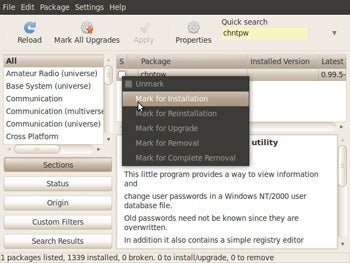
In the resulting window's Search field, enter chntpw. A plan with that name should announced in the list of packages beneath. Click it and select Mark for installation. Click the Apply toolbar icon. Click Apply, and wait until the installation is consummate.
At present mount your drive: From the top menus, select Places, then your internal difficult drive or Windows segmentation. When it's mounted, a File Browser window (much like Windows Explorer) will appear.
Past double-clicking the binder icons, go to the Windows bulldoze's Windowssystem32config folder. Exit this window up.
Now you can remove the password.
From the top menus, select Applications, Accessories, Last. This brings up a black window like to Windows' control line (or the DOS box for you old-timers).
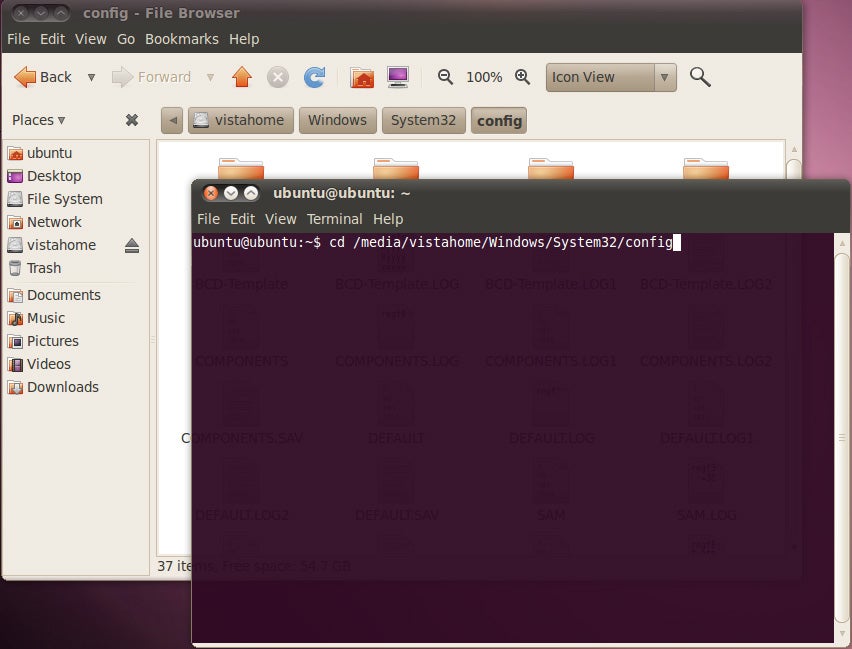
Arrange these two windows then that you can encounter the top section of the File Browser window behind the Terminal window.
In the Concluding command line window, type cd /media/ (note the SPACE after cd) and the path to your config binder, using the folder names at the height as a guide. I wish I could only tell you lot to type "cd /media/windows/system32/config", but different the Windows control line, Ubuntu's Terminal is case sensitive. Depending on what version of Windows y'all're trying to repossess, it may exist windows/system32 or Windows/System32, and Ubuntu won't run into information technology if you get the case wrong.
When it's typed, press ENTER.
Now type sudo chntpw -u logon SAM, where logon is the logon name for the administrator account. For instance, if you're trying to accept over my business relationship, you'd enter sudo chntpw -u Lincoln SAM. Remember, everything here is case sensitive, including the logon proper noun.
Subsequently you lot hit ENTER, a lot of text volition scroll up very quickly. If you entered the text correctly, the final section will begin ". . . . User Edit Menu:"
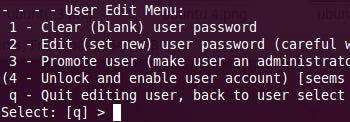
Now printing 1 (the number, non lower-case Fifty), then ENTER.
At the resulting question, press y.
When the program is done, click the ability button logo in the upper-right corner and reboot into Windows. The account in question will no longer require a countersign.
Read the original forum give-and-take.
Add your comments to this article below. If y'all have other tech questions, email them to me at answer@pcworld.com, or post them to a community of helpful folks on the PCW Answer Line forum.

How To Access Administrator Account In Windows 8 Without Password,
Source: https://www.pcworld.com/article/503628/admin_no_password.html
Posted by: ponobeeked.blogspot.com
0 Response to "How To Access Administrator Account In Windows 8 Without Password"
Post a Comment